Class Diagram
Class Diagram - structural software design pattern
Categories
Design PatternPublished on: 2020-05-13
Word count: 991
Estimated reading time: 5 minutes
The class diagram is a structural software design pattern. It is also known as a blueprint or base class.
A class diagram shows different classes, their fields and methods, and how they are connected to other classes. With a class diagram the base structure of an application is designed and developers only have to fill out the functions.
It is also possible to generate a class diagram from source to get a better understanding and overview of the existing application. Vise versa, depending on the program used, a class diagram can generate code but only the blueprint, no functionalities are generated.
Class
A class at its most basic level looks like this:

Fields
Fields are added in a separate box under the class name like so:
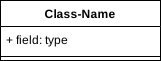
Note: If no fields are needed this box can be skipped completely.
The order and syntax is important here.
Each line first has a +, -, ~ or none (uncommon). This indicates the field security:
| Symbol | Clear Text | Meaning | Code example |
|---|---|---|---|
+ | Plus Sign | Public field | public String myString; |
- | Minus Sign | Private field | private String myString; |
~ | Tilde | Protected field | protected String myString; |
| None | None | Local field | String myString; |
Note: Security levels of fields vary in languages. You should know which exist in the project language. Their meaning/effect also varies sometimes.
Next, the field name is typed.
This should be something meaningful, but there is no requirement to do so. E.g. calling your variable x instead of money is allowed, but will decrease readability of your code.
Followed by the field name is a : (column) with the field type.
This is the type of the field. For example, in the table above we used the type String.
Note: Types also vary with languages. Each language has some sort of primitives, but even they are often written differently. I.e.
intin Java isi32/u32in Rust.
Furthermore, not only primitives can be used here, but everything the languages, libraries and your project provides.
Lastly, it is possible to assign a default value or constant but is rarely done:
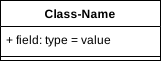
After the field type a = (equality-sign) is placed, followed by the fields value.
Note: The value also depend on the language of course. I.e. in Java
12is valid, but in Rust you might have to say12i32.
Fields Examples
| UML | Java Code | Rust Code |
|---|---|---|
+ myString: String | public String myString; | pub myString: &str |
- money: int | private int money; | money: u32 |
~ enabled: Boolean = true | protected boolean enabled = true; | enabled: bool = true |
instance: MyClass | MyClass instance; | instance: MyClass |
Methods
More or less the same as for fields applies to methods.
A third box is placed under the fields box:
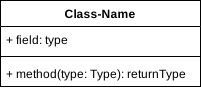
Note: If no methods are needed this box can be skipped completely.
Each line first has a +, -, ~ or none (uncommon). This indicates the method security:
| Symbol | Clear Text | Meaning | Code example |
|---|---|---|---|
+ | Plus Sign | Public method | public void myMethod() { ... } |
- | Minus Sign | Private method | private void myMethod() { ... } |
~ | Tilde | Protected method | protected void myMethod() { ... } |
| None | None | Local method | void myMethod() { ... } |
Note: Security levels of methods vary in languages. You should know which exist in the project language. Their meaning/effect also varies sometimes.
Next, the method name is typed.
This should be something meaningful, but there is no requirement to do so. E.g. calling your method dNYVtetFVAbxUaj instead of transferMoney is allowed, but will decrease readability of your code.
Followed by the method name are (...) (round brackets). Inside them are method arguments/parameters listed. Such method arguments are written the same as fields, except that they do not have a security level.
If there are no method parameters the brackets stay empty.
Followed by the method name and its parameters is a : (column) with the method type.
This is the type of the field. For example, in the table above we used the type void.
If nothing is returned, one can either, use the programming-keyword for nothing (i.e. in Java void), or, simply write nothing (no column either) there.
Note: Types also vary with languages. Each language has some sort of primitives, but even they are often written differently. I.e.
intin Java isi32/u32in Rust.
Furthermore, not only primitives can be used here, but everything the languages, libraries and your project provides.
Methods Examples
| UML | Java Code | Rust Code |
|---|---|---|
+ myMethod() | public void myMethod() { ... } | pub fn myMethod() { ... } |
- myMethod() | private void myMethod() { ... } | fn myMethod() { ... } |
~ myMethod() | protected void myMethod() { ... } | fn myMethod() { ... } |
myMethod() | void myMethod() { ... } | fn myMethod() { ... } |
+ transferMoney(amount: int) | public void transferMoney(int money) { ... } | pub fn transferMoney(amount: u32) { ... } |
+ moneyBalance(): int | public int moneyBalance() { ... } | pub fn moneyBalance(): u32 |
Abstractness
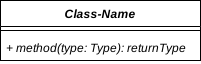
Whenever something is abstract (or better: stated as undefined) it is written cursive in UML.
Here is an abstract basic class:

Here is an abstract class with an abstract method:
Interfaces, Enumerations and others
Interfaces, Enumerations and others are treated as classes, but have a prefix placed in <<...>> (two diamond brackets).
Here is a basic interface:

Here is an interface with methods and fields:

Here is an enum:

Note: Other types depend on the language. Some have interfaces, some have structs (structures), some have enums and some have something totally different. Use whatever the language is providing.
Also pay attention to the rules of your language.
E.g. some languages do not allow fields in interfaces or methods in Enumerations.
Signatured vs. Non-Signatured
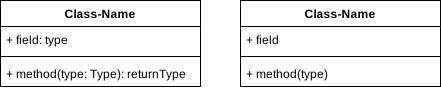
Signatured means that the field types, parameter types and return types (i.e. all types) are written down. It can be useful to first just get an overview of what is needed and then later decide on the concrete types.
Here is the difference: